


ChatGPT can feel confusing when you open it for the first time. You see a blank box, a blinking cursor, and no clear button that says start here. This chatgpt for beginners guide fixes that. You will learn how to use chatgpt for beginners in plain steps, from creating a free account to writing your first good prompt. No tech skills are needed. If you can type a message, you can use ChatGPT. This guide shows you how to use chatgpt step by step, so you can start with confidence. By the end, you will know what ChatGPT is, how to start using chatgpt on your computer and phone, what the free plan gives you, and how to get useful answers every time you ask.
What Is ChatGPT?
ChatGPT is an AI chatbot built by OpenAI. You type a question or a request in plain words, and it answers in plain words. It can explain a topic, write an email, plan a trip, or turn a rough idea into a clear draft. Think of it as a smart helper that is always ready to talk. It does not search the web like Google. It writes a fresh answer for you, based on what it has learned. This chatgpt tutorial for beginners starts with that one idea. ChatGPT is a tool you talk to, not a search box you type keywords into. The fastest way to learn how to use chatgpt is to ask it a question you already know the answer to, so you can judge how well it responds.
How to Use ChatGPT for Beginners in 7 Easy Steps
Learning how to use chatgpt takes about five minutes. Follow these seven steps, and you will send your first message today.
- Go to ChatGPT. Open your browser and go to chatgpt.com. The free app works on your phone too. No download is needed on a computer.
- Create a free account. Click Sign up, then use your email address, or continue with Google, Microsoft, or Apple. The free plan is enough to learn and use ChatGPT every day.
- Open a new chat. After you sign in, you will see a message box at the bottom of the screen. Click New chat in the sidebar if you want a fresh start.
- Type your first prompt. A prompt is the message you send to ChatGPT. Try something simple, like “Explain photosynthesis in simple words for a 12 year old.”
- Press Enter and read the answer. ChatGPT will type out its answer in a few seconds. Read it, and check that it makes sense for your question.
- Ask a follow up question. If the answer is too long, too short, or not quite right, just say so in the same chat. Try “Make it shorter” or “Give me an example.”
- Save or copy what you need. Copy the answer into your notes, a document, or an email. You can also click a past chat in the sidebar to find it again later.
That is the whole process. Once you know how to use chatgpt this way, the rest is practice. Start with small tasks, and move to bigger ones when you feel ready.
A Tour of the ChatGPT Screen
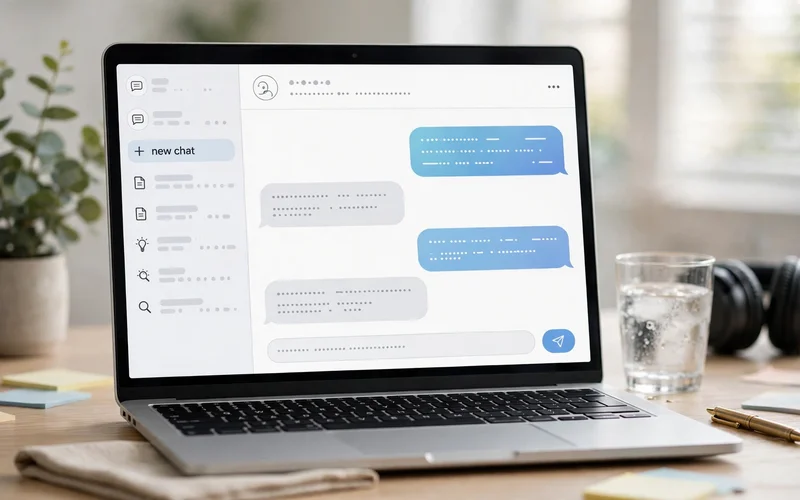
The ChatGPT screen is simple once you know the parts. The middle of the screen is where your chat appears. The message box at the bottom is where you type. The sidebar on the left shows your past chats, so you can open an old one and keep going. The plus button near the message box lets you add a photo or a file, search the web, or use voice mode. At the top, a model menu lets ChatGPT pick the best model for the job. Beginners can leave it on Auto. As you learn how to use chatgpt, these parts will soon feel natural. Start a new chat for each new topic, so old answers do not confuse the new ones.
ChatGPT Free vs Plus: Which Plan Do You Need?
The free plan is the best place to start, and it is enough for most beginners. It gives you the latest model with some usage limits, plus web search, image creation, and file uploads. During busy hours, free users may wait longer or hit a limit sooner. If you are still learning how to use chatgpt, the free plan is the right choice. ChatGPT Plus costs $20 per month. It gives you much higher limits, faster answers at busy times, and more access to advanced tools. Pay only if you use ChatGPT every day and keep hitting the free limits. If you are still comparing AI tools, our guide to ChatGPT vs Gemini explains how the two chatbots differ and which one fits your needs.
How to Write Good ChatGPT Prompts: 5 Simple Rules
Good answers start with good prompts. These five rules are the heart of every chatgpt prompts for beginners guide, and they work for any task.
- Be specific. A vague prompt gets a vague answer. Say what you want, who it is for, and how long it should be.
- Give some context. Tell ChatGPT the background. A short sentence about your goal changes the answer a lot.
- Say what format you want. Ask for a list, a table, a short paragraph, or steps. ChatGPT follows the format you name.
- Show an example. Paste one example of the style you want. ChatGPT will copy the tone and shape.
- Follow up in the same chat. Treat the first answer as a draft. Ask ChatGPT to fix it, shorten it, or add an example.
Compare these two prompts. A weak prompt says, “Write about dogs.” A strong prompt says, “Write a 100 word paragraph for a 10 year old about why dogs make good pets. Use simple words and a friendly tone.” The second prompt gives a clear task, an audience, a length, and a tone, so the answer is useful right away. This is how to use chatgpt well. You do not need clever words. You need clear instructions.
10 Useful Things Beginners Can Do With ChatGPT
Most beginners only ask simple questions. It can do much more. If you want to practice how to use chatgpt, try one of these tasks this week.
- Explain hard topics in simple words. Ask it to explain anything like you are 12 years old.
- Write and fix emails. Paste a rough draft and ask for a polite, short version.
- Summarize long text. Paste an article and ask for the five main points.
- Plan a trip or a day. Give your budget, dates, and interests, and get a simple plan.
- Learn a new language. Ask for daily practice, simple sentences, and corrections.
- Brainstorm ideas. Ask for ten blog titles, business names, or gift ideas.
- Make images and design ideas. Describe a picture and ask ChatGPT to create it, then polish it with our guide on how to use Canva for beginners.
- Study for a test. Ask for quiz questions, flashcards, or a simple revision plan.
- Cook with what you have. List the food in your fridge and ask for a recipe.
- Write a CV or a cover letter. Give your skills and the job title, and ask for a clean draft.
Pick one task from this list and try it today. Each time you use ChatGPT for a real task, you learn what it does well and where you still need to check its work.

How to Use ChatGPT on Your Phone
ChatGPT works the same way on your phone. The steps for how to use chatgpt are the same on mobile. Download the free ChatGPT app from the ChatGPT download page, sign in with the same account to sync your chats between phone and computer. The app also has voice mode, so you can talk to ChatGPT instead of typing. Tap the microphone icon, speak your question, and listen to the answer. The app is free to download, and the free plan works the same way on mobile.
5 Mistakes Beginners Should Avoid
- Trusting every answer. ChatGPT can make mistakes and sound sure about them. Check important facts from a trusted source before you use them.
- Writing vague prompts. A one word question gets a general answer. Add a little detail, and the answer gets much better.
- Sharing private information. Never paste passwords, bank details, ID numbers, or private personal data into a chat.
- Using one chat for everything. A long chat full of different topics confuses ChatGPT. Start a new chat for each new topic.
- Giving up after one bad answer. Ask a follow up question instead. Most weak answers get much better with one clear fix.
These five habits make the difference between a beginner who quits and one who gets real value. When you learn how to use chatgpt with care, it becomes a tool you trust for daily work, study, and ideas.
Frequently Asked Questions
Is ChatGPT free to use?
Yes. ChatGPT has a free plan that you can use every day. It includes access to the latest model with some usage limits, web search, image creation, and file uploads.
Do I need to download an app to use ChatGPT?
No. You can use ChatGPT in any web browser on your computer or phone. Learning how to use chatgpt in a browser is the easiest start. The free mobile app is useful if you want voice mode and quick access, but it is not required.
Can ChatGPT make mistakes?
Yes, it can. ChatGPT sometimes gives wrong facts or out of date information, and it can sound confident while doing so. Always check important facts from a trusted source before you share them.
What is the best first prompt for a beginner?
Start with a task you know well, so you can judge the answer. For example, ask “Explain how to boil an egg in 5 simple steps for a beginner.” If the answer is clear and correct, try your real task next.
Is my data private on ChatGPT?
Your chats are saved to your account, and you can delete them at any time. In Settings, you can also turn off the option that lets your chats improve the model. Still, never share private or sensitive information in a chat.
Final Thoughts: How to Use ChatGPT for Beginners
You now know how to use chatgpt for beginners, from your first sign up to your first good prompt. The next step is simple. Open ChatGPT, pick one small task, and try it today. Start with the free plan, ask clear questions, and check important facts. For more simple tech guides, visit the TechOnPeak homepage and explore our latest Software Guides.
